Nicholas L. (@NoProfessional582) // Personal Portfolio

Practical, self-hosted apps built to solve everyday problems on your own computer.

I like turning real-world frustrations (keeping up with contacts, reading tech news without clutter, talking to a desktop AI assistant, or staying organized during a job hunt) into clean, working software. I design how each app should work and feel, and partner with AI coding tools to bring them to life.

01 // About Me

Nicholas L.
@NoProfessional582

Systems Thinker · Tinkerer · Builder

Over two decades of mission-critical leadership and operational strategy, channeled into local-first software, home-lab engineering, and life off-screen.

For over two decades, my focus was centered on large-scale leadership, operational strategy, and mission-critical decision-making. That background ingrained a permanent habit: I look at everything through the lens of systems, feedback loops, and downstream effects.

Today, that same mindset fuels my obsession with modern technology and hands-on creation. When I'm not architecting enterprise cloud workflows or running a segmented home lab stack, you'll find me on the pitch coaching youth soccer, dialing in mechanics on the fairway, or dissecting complex automation pipelines.

I don't come from a cookie-cutter computer science track (hence the handle @NoProfessional582). I build because I am relentlessly curious about how pieces connect, where friction hides, and how thoughtful tooling can give people their time and autonomy back.

The Local-First Philosophy

Most modern software demands a recurring subscription, an active account, and custody of your sensitive data just to organize a simple workflow. I prefer software that respects your sovereignty: fast, local-first tools that run directly on your own hardware, solve immediate problems, and get out of your way.

01 // CORE PILLAR

Data Sovereignty First

Your notes, applications, files, and personal data belong entirely to you, not an external third-party cloud. Privacy shouldn't be an opt-in luxury; it should be the baseline architecture.

02 // CORE PILLAR

Frictionless Deployment

Good software shouldn't require a 30-step configuration guide. Whether it launches via a clean container run, a single-command startup script (run.bat / npm start), or a standalone binary, getting up and running should be dead simple.

03 // CORE PILLAR

Built for Ground-Level Utility

I don't build software to showcase unnecessary abstractions. Every interface, script, and application is born from real operational friction, designed to eliminate redundant clicks, remove cognitive clutter, and run reliably day in, day out.

At a Glance: Lab Architecture & Off-Screen

PRODUCTION HOME LAB Pure Debian Rebuild

Minisforum N5 NAS

Dedicated production server hosting self-managed Docker stacks, local databases, and internal services across segmented Zero-Trust VLANs, currently being rebuilt on a pure Debian base.

PRIMARY DEV WORKSTATION Debian-Based MX-Linux VM

HP Omen 16 + MX-Linux VM

All active development runs inside a Debian-based MX-Linux virtual machine on my primary HP Omen 16 gaming laptop, sharing a common Debian foundation and Docker service layout with production while keeping desktop dev tooling, experiments, and AI agents strictly isolated.
Current Rig & Lab
  • Minisforum N5 NAS (Pure Debian)
  • HP Omen 16 (Debian-Based MX-Linux VM)
  • Docker Stacks
  • Zero-Trust VLANs
Languages & Tools
  • Python
  • TypeScript
  • PowerApps / YAML
  • Bash
  • Docker
  • Git
Off-Screen Pursuits
  • Youth Soccer Coach
  • Systems Reading
  • The Driving Range
Hometown Roots
  • Pacific Northwest Spirit
  • Southern California Base
02 // Featured Projects

Apps I've Built

Four open-source tools designed for personal use on your own machine, from managing contacts and tasks to reading the news and tracking job applications.

Click the tabs below any screenshot to preview different screens, or open the full project page for a closer look.

No. 01 Personal CRM & Tasks TypeScript Docker npm

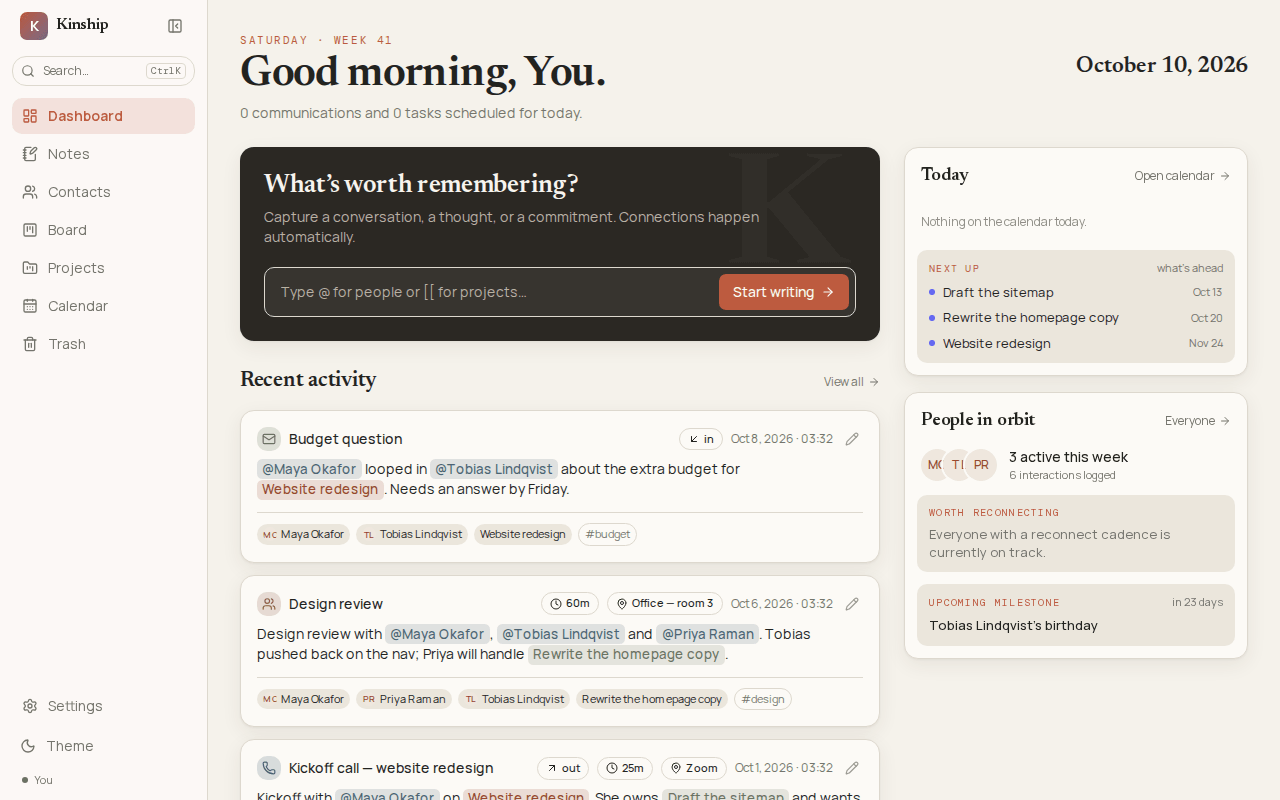
Kinship

Contacts, notes, and to-do boards connected naturally by @mentions.

Usually your contacts live in one app, your meeting notes in another, and your to-do list in a third. Kinship keeps all three together in one private web app that you can run on your computer with either Docker (docker compose up -d) or npm.

  • Write First, Build Profiles Later: Tag a person with @ or a task with [[ while writing a quick note. If you tag someone new, your note saves right away and a reminder to build out their contact profile is queued up for later.
  • Interactive 3D Relationship Map: Explore how your contacts, projects, notes, and tasks connect in a visual 3D map where clicking any item highlights everything related to it.
  • Works with Your AI Assistant: Local AI tools like Claude Code or Hermes can look up your notes and add tasks for you, without being able to permanently delete anything.
Kinship: Today View
Kinship Today View: tasks due, people to follow up with, and recent notes
No. 02 Desktop Voice Companion Windows 11 TypeScript & Python npm

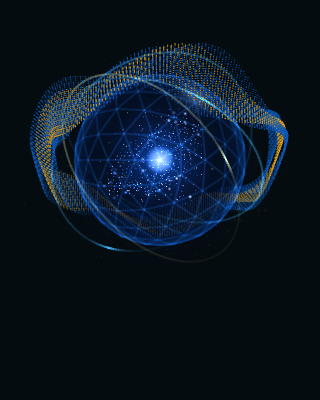
Phantom Orbital

A floating Windows orb that lets you talk to your AI assistant out loud.

Instead of switching windows to type into a chat box, Phantom Orbital sits quietly in the corner of your screen. Hold a shortcut key or say a wake phrase ("Hey Megan") to ask a question or give a command by voice.

  • Local Voice + Flexible AI Brain: Wake-word detection, speech-to-text, and spoken replies run locally on your PC, while your agent harness (like Hermes) can use a cloud LLM (such as OpenAI) or go 100% local via Ollama or LM Studio.
  • Swappable Personalities: Easily change the assistant's name, wake phrase, speaking voice, and personality style with a simple folder of settings.
  • Safe Action Approvals: When your agent wants to run an important action, the orb shows a click-to-approve card on screen and never approves actions by voice alone.
Phantom Orbital: Listening Mode (Dark)
Phantom Orbital desktop assistant in Listening mode
No. 03 Tech News Reader TypeScript SQLite npm

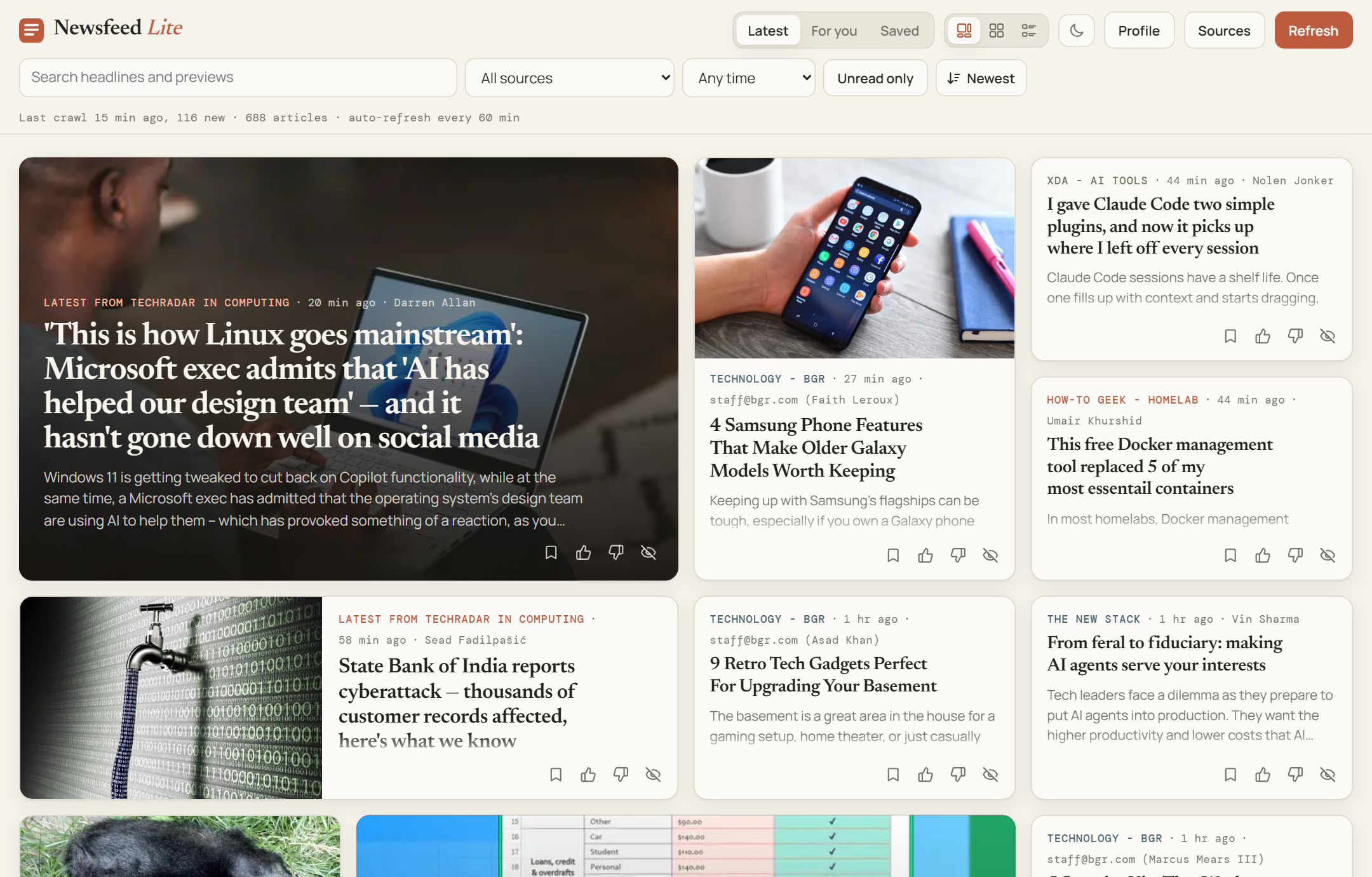
Newsfeed Lite

A clean, calm local reader for keeping up with tech news sites.

Give it your favorite tech blogs, topic pages, or RSS feeds, and it gathers clean article cards (headline, cover image, and a short summary) linked straight to the full article, without ads or noisy social feeds.

  • Cuts Out Duplicate Stories: When five different sites cover the same announcement, you see one main card with "Also covered by…" links underneath.
  • Learns What You Care About: Give articles a quick thumbs-up, thumbs-down, or hide, and the "For You" tab surfaces more of the topics and sources you actually enjoy.
  • Simple Setup: Runs on your computer with a single command (npm start), with no complicated servers or external services required.
Newsfeed Lite: Latest Articles (Bento View)
Newsfeed Lite Latest feed in warm paper Bento layout
No. 04 Career Organizer Python & JavaScript Docker 1-Click Start

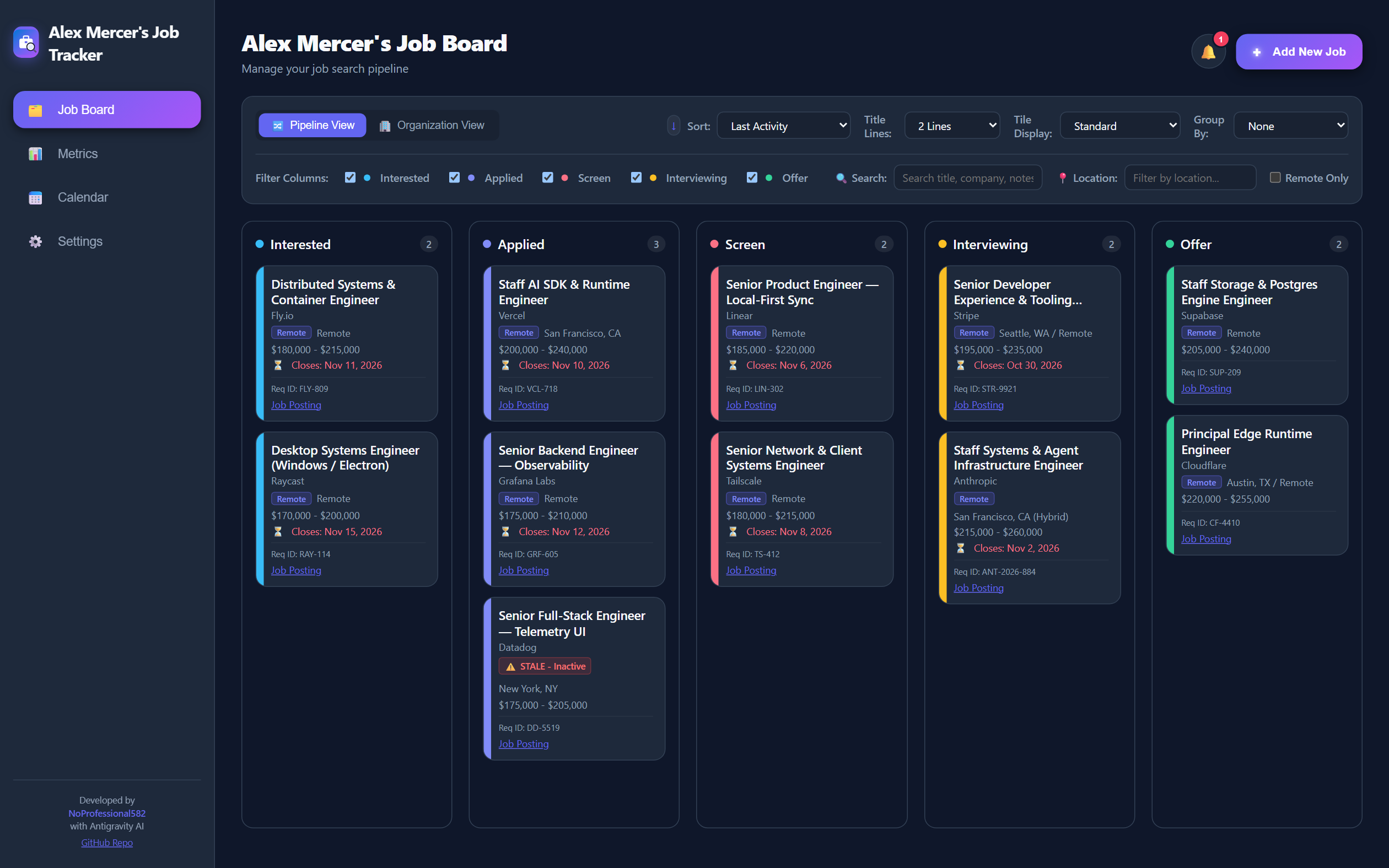
Job Tracker

An all-in-one board, calendar, and interview prep vault for your job search.

Applying for jobs gets messy fast when resumes, recruiter emails, interview dates, and company notes are scattered across spreadsheets and folders. Job Tracker puts everything in one clean workspace that you can launch with a one-click run.bat script or run in Docker.

  • Visual Application Board: Drag and organize roles from "Interested" and "Applied" through "Interviewing" and "Offer".
  • Built-In Interview Prep Vault: Save company research, questions for interviewers, and your personal STAR stories right inside the job card you're preparing for.
  • Follow-Up Reminders & Calendar: Tracks interview times on a monthly/weekly calendar and alerts you when an application has gone quiet for 14 days.
Job Tracker: Application Board
Job Tracker Kanban board showing active applications across stages
03 // Building with AI

Human Direction, AI Execution

A self-hosted Agentic Development System where three AI coding agents plan, build, test, and release software under one shared rulebook.

Read Full Process Breakdown →

AI coding tools are fast and capable, but left alone they bring inconsistent tech stacks, context limits, approval fatigue, and unverified "it works" claims. To solve that, I built a dedicated Linux development VM (mx-linux-dev) where Claude Code, OpenAI Codex, and Google Antigravity work under one shared, version-controlled rulebook.

My role is to set the direction and approve the decisions that matter. The agents write all of the code inside an isolated, Debian-based sandbox VM whose Docker and service layout aligns with my pure-Debian production setup, guided by structured plans, an automated multi-agent orchestrator, an 11-step verification pipeline, and a lessons log that turns repeated mistakes into permanent rules.

01 // Sandbox & Rulebook 29 Core Rules + 7 Topic Files

Real Power Where Mistakes Are Cheap

Agents run on an isolated Hyper-V Linux VM with Docker, sudo, and git push, and zero network access to production. All three agents point to one shared rulebook (/srv/agents/rules/) with three clear approval tiers and mandatory backups.

Guardrail: Risky host changes pause automatically for a Hyper-V checkpoint.
02 // Plain-Language Plans 14 Plans · 45 Phases · 156 Steps

Approve Plans & Decisions, Not Keystrokes

New apps and features become structured plans broken into mergeable phases and session-sized steps. Each plan generates a plain-language overview.html web page so I can review and approve the architecture, user flow, and open decisions before coding begins.

Continuity: State lives in files on disk so any fresh session can pick right up.
03 // Plan-Run Orchestrator Planner · Builder · Validator

Separated Building & Blind Validation

Running /plan-run launches a supervisor session that never writes code itself. It dispatches a Planner (Opus), headless Builders (Sonnet or Codex), and an independent Validator that writes use-case tests without seeing the builder's reasoning.

Control: Pauses and sends a push alert only when a human decision or UI review is needed.
04 // 11-Gate Verification & Memory check.sh + 112 Logged Lessons

Every Claim Proven Before Merge

Every change must pass scripts/check.sh: lint, static types, unit tests, dependency & secret audits, container build & health checks, integration tests, Playwright desktop/mobile browser tests, and live database migration upgrades.

Institutional Memory: When a mistake pattern happens twice in the lessons log, it becomes a rule.
Deep-Dive Case Study

Inside My Agentic Development System

Explore the full breakdown: the 5-part system architecture, rule hierarchy and orchestrator diagrams, all 8 operational layers (including the upstream dependency tool and shared Postgres/Caddy/Authentik platform), 7 design takeaways, and honest limits.

Explore the Full System →
AI Tools in My Workflow
Coordinated through one shared rulebook, handoff logs, and app integrations:
  • Claude Code
  • OpenAI Codex
  • Google Antigravity
  • Hermes Agent
04 // Under the Hood

Tools & Technologies

The building blocks used across these four projects.

App Languages
  • TypeScript
  • JavaScript
  • Python
  • HTML & CSS
  • PowerShell Scripts
Desktop & Web
  • Node.js
  • Electron (Windows Desktop)
  • Python Flask
  • Docker Compose
Local Data Storage
  • SQLite (Single-File Databases)
  • PostgreSQL (Self-Hosted)
AI & Voice Integrations
  • Local Voice-to-Text (Whisper)
  • Local Text-to-Speech (Piper)
  • AI Agent Connections (MCP & OpenAI-Compatible APIs)